RUBS Utility billing for landlords

The spreadsheet can retire.

Split the master utility bill. MeterEase emails every tenant their share.

Upload one water, sewer, trash, gas or electric bill. MeterEase reads the vendor, period and total, then splits it by square footage, occupants, bedrooms or a blend, then emails each tenant their share with the source bill attached. You approve every send, unless you turn on auto-send for a property. The month’s bill-back is done in minutes, not a weekend evening.

Tenants pay you the way they already pay rent. MeterEase never touches tenant money.

How many weekend evenings has that spreadsheet taken this year?

Try the free calculator - no account, no card
  • From $14/month
  • You approve every send (auto-send is opt-in)
  • QuickBooks CSV export
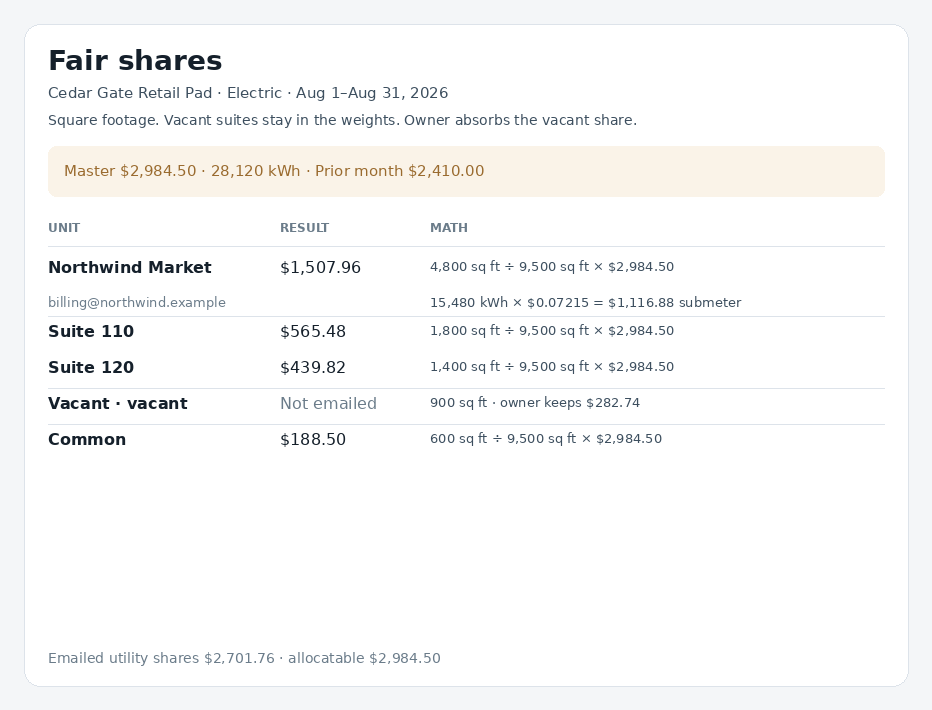
MeterEase Fair shares screen: an electric bill split by square footage, with the math shown for each unit
Cedar GateFictional sample

Sample workflow: upload a $180.40 water bill, check the square-footage split, review each share, then approve tenant emails. Suite 210 owes $66.15. Vacant units are not emailed.

You approve every send unless you turn on auto-send for a property.

Illustrative animation, not an app recording. Cedar Gate and its suites are fictional.

MeterEase app screen with sample data. Cedar Gate is a fictional property.

Three reasons the spreadsheet loses.

If a tenant asked how you got their number, could you show them in one line?

  • Drop the PDF. Keep your Saturday.

    Upload the bill PDF. MeterEase reads the vendor, period and total, applies your method, and does the math for every unit.

  • A split they can check.

    Each tenant gets their own share, the line “How your share was calculated,” and the source bill attached.

  • Empty units, mid-month moves, still covered.

    Pick a vacancy rule once. Mid-month move-ins and move-outs prorate on Growth and Portfolio. Vacant units never get an email.

How it works

From one PDF to every inbox.

Upload, check, and MeterEase emails the shares. Nothing reaches a tenant until you approve it, unless you turn on auto-send for a property.

  1. 1

    Upload the master bill

    Drop in the water, sewer, trash, gas, electric, CAM or insurance bill as a PDF, or type it in. Confirm the vendor, period and total.

  2. 2

    Check the split

    Choose square footage, occupants, bedrooms, percent or a hybrid. See every input and every unit’s total before anything goes out.

  3. 3

    MeterEase emails every tenant.

    Each tenant gets their share with the source bill attached. Then export a CSV for your rent app, or push to DoorLoop.

In the product

Every number, before anyone else sees it.

The method, the inputs, each suite’s total, and which bills are still waiting this month.

Illustrative demos, not app screenshots. The Cedar Gate property and suites are fictional.

The old Sunday night. A clearer next month.

Same fictional $180.40 water bill. Same square-footage method.

The spreadsheet

Suite · Area · Formula · Email?

110 · 720 · =720/2400*180.40 · To write

210 · 880 · =880/2400*180.40 · To write

120 · 800 · Owner share · Vacant

Check rounding. Attach the bill. Write each email.

MeterEase · Fair shares

Suite 110 $54.12 · Ready

Suite 210 $66.15 · Ready

Suite 120 $60.13 · Owner

You approve the send unless you turn on auto-send for a property. MeterEase emails the shares with the source bill attached.

Cedar Gate · Square footage

Fair shares

SuiteSq ftShareStatus
110720$54.12Ready
210880$66.15Ready
120800$60.13Owner

Approve before send

Fair sharesThe method, the inputs and each suite’s total, before MeterEase emails anyone.

Suite 210 · September water

Tenant share

$66.15

How your share was calculated

880 ÷ 2,400 sq ft × $180.40

Master water bill attached

Waiting for your approval

Tenant shareOne suite’s share, with the line “How your share was calculated.”

Cedar Gate · September

Month checklist

  • Electric Not started
  • Water Sent
  • Gas Not started
  • Trash Not started
  • Sewer Not started
Month checklistSee which of electric, water, gas, trash and sewer are sent this month.

See an email generated from the app template with fictional data.

Photo of Drew Starbuck

Why it exists

Built because the other software asked for a whole other job.

Drew Starbuck

Founder · Estate planning attorney, Williams Starbuck (Las Vegas)

I'm Drew Starbuck, an estate planning attorney. Many of my clients own rental properties, and I kept hearing the same complaint: every month they had to split the utility bills across tenants by hand, double-check the math and hope nobody pushed back. The software they tried wanted them to pay for a whole property-management suite just to do it. So I built MeterEase to do that one job well, so landlords get that time back.

Why buy a full property-management suite just to split the water bill?

Drew Starbuck at Williams Starbuck

Not sure how to split this month’s bill?

Enter the bill and your units. The free RUBS calculator shows every tenant’s share to the cent. No account and no card.

Questions

Have a question that is not about signing up?

Send a question about MeterEase. This form does not start a trial and does not collect lease documents, utility bills, or tenant records. Privacy Policy.

MeterEase policies: Privacy Policy · Terms of Service. Questions: support@meterease.com.

Compare

Spreadsheet, app, billing company or MeterEase?

How the usual ways of billing back utilities stack up when you bill them yourself, once you count your time.

MeterEase stays on screen. Swipe sideways for the other columns.

FeatureMeterEaseSpreadsheetBasic bill-split appOutsourced billing company
Who does the workYou upload the bill and approve the send. MeterEase emails the shares and does the rest.You build the sheet, enter the bill and write every email.You enter the total and the shares. The app does the arithmetic.The company runs billing for the property.
Split methodsPercent, square footage, bedrooms, occupants and hybrid blends.Whatever formula you maintain.Often a single percent split.Whatever the service agreement names.
Reads the bill PDFYes. You check the vendor, period and total before you confirm.No. You type it.Varies. Many ask you to type the total.They collect the bill for you.
CAM and insuranceYes, on Growth and Portfolio.If you build the columns.Rarely.Sometimes, depending on the quote.
Proration and vacanciesVacancy rule on every plan. Mid-month proration on Growth and Portfolio.If you write the formulas.Often not supported.Handled inside their process.
Tenant email with source billEvery email, after your send checklist or opt-in auto-send.You write and attach each one.Varies.Part of their program.
Rent-app exportCSV with paste notes, QuickBooks CSV, or DoorLoop push.You retype each amount.Uncommon.Through their own system.
Price$14 to $69 a month. Portfolio adds $1.50 per unit over 50.Free, plus your time every month.Usually a low monthly fee.Quoted per property.
Best forLandlords and property owners who bill utilities themselves.Landlords who enjoy formulas.Simple even splits.Large apartment communities.

The other columns describe how these approaches typically work. They are not reviews of specific companies. Named comparisons: MeterEase vs Utility Ranger ·MeterEase vs Livable.

Pricing

Three plans. One job.

Portfolio includes 50 units, then $1.50 more per unit. Start with Growth free for 7 days. Full pricing and trial terms.

Starter

One property, up to 4 units

$14$7/month

Founding landlord: 50% off for life

$14/month

Sign up

Portfolio

More than 20 units or 5 properties

$69$34.50/month

Founding landlord: 50% off for life

$69/month

Includes up to 50 units, then $1.50/unit a month

Sign up

A card is required to start. You are charged when the trial ends unless you cancel first, and you can cancel anytime in the billing portal.

FAQ

Questions worth asking before the next bill arrives.

What is RUBS utility billing?

RUBS (ratio utility billing system) divides one master utility bill among the units in a building using a formula, such as square footage, occupants or bedrooms, instead of a meter in each unit. MeterEase runs that formula each month and emails every tenant their share. Read the full RUBS guide.

How do I split a utility bill between tenants?

Pick a method your lease allows, divide each unit’s factor by the building total, and multiply by the bill. A 720 sq ft unit in a 2,400 sq ft building pays 30%. Try it with your own numbers in the free calculator. Open the RUBS calculator.

Which bills can I split?

Electric, water, gas, trash and sewer on every plan. Growth and Portfolio also split CAM and insurance.

How are vacant units handled?

You choose. A vacant unit can stay in the split so the owner covers its share, or be left out. Vacant units never get an email.

Does MeterEase collect the money?

No. Tenants pay you the way they already pay rent. MeterEase sends the shares and gives you a CSV for your rent app, or pushes the charges to DoorLoop.

Is RUBS billing allowed where my property is?

It depends on your lease, your state and city, and the utility tariff. MeterEase does the math and offers optional checklists for Arizona, Texas and Oregon bill formats. Those checklists are not a compliance review. It is not legal advice. What to check before you bill.

What happens when the trial ends?

Your plan starts automatically after 7 days. Cancel before then and you pay nothing. After that, cancel anytime and keep access through the end of the paid month.

This month’s shares, ready for every inbox.

Growth is free for 7 days. A card is required to start. You are charged when the trial ends unless you cancel first, and you can cancel anytime in the billing portal. Cancel before the trial ends and you pay nothing.

What would you do with that weekend evening back?